
Velox plugin · Location tools

Velox Map Locator

Location finder for WordPress. Built without the API-key baggage.

Manage your locations once, then publish them anywhere through reusable locators; with a synchronized map and list, search, filters, opening hours, and full control over when an external map provider is allowed to load.

Version 1.0.0
License GPL-2.0-or-later
Privacy No Velox telemetry
Updated August 2026
Velox Map Locator
Locations
Dubai Office Downtown Dubai, UAE
Abu Dhabi Office Al Maryah Island, UAE
Sharjah Office Al Majaz, UAE
Central Park Market Street
V
Map Settings Velox Map Locator
General Controls Style
OpenStreetMap ⌄
14 ⌄
Group nearby markers
Zoom controls
V
Built for WordPress Focused. Familiar. Responsible.
✓
Zero Telemetry No tracking or usage reporting
All Checks Pass Clean install profile

WordPress

6.6 or higher

Tested Up To

7.0.4

PHP

7.4 or higher

Map Providers

OSM · Google · Custom XYZ

How It Works

One dataset. Different location experiences.

Add and maintain your location information once, decide how each Locator should use it, then publish that experience wherever you need it.

01
Input

Add your Locations

Create the places you want to manage — branches, stores, offices, service centres, dealers or any other location.

Al Qasimia Showroom Sharjah
Deira Service Centre Dubai
Yas Island Kiosk Abu Dhabi
02
Configure

Build a Locator

Choose which Locations belong in the Locator, then configure how visitors should interact with them.

Source All Locations
Layout Map + List
Search Enabled
Filters Enabled
Provider OpenStreetMap
03
Outcome

Publish & Reuse

Place the Locator anywhere using the block or shortcode and reuse the same maintained Locations across multiple experiences.

Locator All UAE Locations
Locator Service Centres
Locator Dubai Locations
Reusable Velox pattern: Input → Configure → Outcome. Only the content and miniature visuals change from one plugin to another.

Use Cases

Where it fits.

The same location dataset can support very different public experiences.

01

Branch and office directories

Publish offices, branches, clinics, schools, service centres or public service points without duplicating location details.

Best fit: organizations with many public-facing locations
02

Dealer and reseller networks

Use types, groups, geographic filters and Near Me sorting to help visitors reach the right dealer, partner or distributor.

Best fit: brands with distributed partner networks
03

Multiple locators from one dataset

Build a nationwide directory, a city locator and a campaign-specific view from the same maintained Locations.

Best fit: sites that need different views of the same data

Core Features

Everything in the free plugin.

Grouped by workflow so visitors can understand the complete capability without reading a wall of disconnected cards.

Location data

  • Unlimited locations, types, groups and reusable Locators
  • Structured addresses with latitude and longitude
  • Contacts, images and per-location marker overrides
  • Additional custom fields for anything else you need to track
  • Weekly hours with split shifts and overnight ranges
  • Special-date overrides and timezone-aware open / closed status

Finding and filtering

  • Text search across the active location set
  • Filters by type, group, country and city
  • Near Me distance sorting from browser geolocation
  • Marker clustering with automatic or forced behavior
  • Coincident-location handling for stacked pins
  • Markers and list cards remain synchronized while browsing

Maps and providers

  • OpenStreetMap through locally bundled Leaflet
  • Google Maps using your own browser API key and Map ID
  • Reusable custom XYZ raster tile profiles
  • Home, Fit All, zoom, scale and fullscreen controls
  • List Only layout needs no map library at all
  • Provider settings are configured once and reused

Presentation

  • Split map + list, map only or list only
  • Velox, Slate, Azure and Forest themes
  • Light, dark or automatic mode
  • Responsive behavior in narrow page-builder columns
  • RTL-aware layouts throughout
  • Gutenberg block and [velox_map_locator] shortcode

Bulk work and support

  • CSV import and export with column mapping
  • Full validation preview before anything is written
  • External ID for controlled update-or-create imports
  • Portable type slugs and hierarchical group paths
  • Spreadsheet-injection protection on export
  • Help bundled locally with guides, tasks and troubleshooting

Location Workflow

Manage locations without leaving WordPress behind.

Location records are presented as a focused management workflow rather than an unfamiliar application bolted onto WordPress.

  • Clear location list

  • Structured address and location data

  • Categories for organization

  • Consistent Velox admin experience

Velox Map Locator Locations Add New Search locations... Downtown Office 48 Market Street Business Marina Branch 12 Waterfront Avenue Retail Central Store 86 King Street Retail Westside Centre 22 Park Road Services Central Park Market Street Central Avenue Harbour Road Map Satellite + − 500 m
Illustration only — this is a simplified visual and not the actual plugin screen. For the real interface, please check the Screenshots section.
Velox Map Locator V Map Settings Configure this locator Save Changes General Controls Style Privacy Map provider OpenStreetMap ⌄ Default zoom 14 ⌄ Initial map position 25.2048, 55.2708 Search radius 25 km ⌄ Marker clustering Group nearby markers Zoom controls Show + and − controls Fullscreen Allow expanded map view Fit All control Fit visible locations Live preview Current locator Park + − Provider OpenStreetMap Clustering Enabled
Illustration only — this is a simplified visual and not the actual plugin screen. For the real interface, please check the Screenshots section.

Map control

Configure the locator around the experience you need.

Keep common map behavior within reach — without overwhelming the interface with options that don’t contribute to the locator.

  • Map provider settings

  • Default map position and zoom

  • Marker and clustering options

  • Map controls and display settings

Multiple providers

Pick the map provider that fits your project — not the other way around.

Google Maps needs an API key, a billing account, and a domain restriction. That’s fine for enterprise. It’s overkill for a small business showing three store locations.

Velox Map Locator ships OpenStreetMap as the default — no key, no billing, no external account. If you need Google Maps for a specific locator, drop the key in. If you have a custom XYZ tile server, use that. Per-locator, not per-site.

  • OpenStreetMap works out of the box

  • Google Maps optional (bring your own key)

  • Custom XYZ tile providers supported

  • Configured per-locator, not site-wide

Velox Map Locator V Map Provider Choose the map source for this locator Current locator Downtown Stores Available providers Select the provider that fits this locator. O OpenStreetMap No API key or billing account required. No key No billing Selected G Google Maps Use your own Google Maps Platform key. API key Billing Choose X Custom XYZ Tiles Use a custom compatible tile endpoint. Advanced Choose Provider preview OpenStreetMap · current selection Park Market Street Central Avenue + − Provider details API key Not required Billing account Not required Configuration scope Per locator
Illustration only — this is a simplified visual and not the actual plugin screen. For the real interface, please check the Screenshots section.
Velox Map Locator Enter a location... All Categories ⌄ Search All Retail Food & Drink Services Entertainment Locations 12 results Downtown Store Retail · 1.2 km away 48 Market Street Open Westside Café Food & Drink · 2.1 km away 22 Park Road Harbour Office Services · 3.4 km away 12 Waterfront Avenue Central Lounge Entertainment · 4.0 km away 86 King Street Central Park Market Street Central Avenue Harbour Road Map Satellite + − Downtown Store Retail · 1.2 km away 48 Market Street Open 500 m
Illustration only — this is a simplified visual and not the actual plugin screen. For the real interface, please check the Screenshots section.

Search & filter

Visitors find the right location before they scroll the map.

Most location plugins hand visitors a big map and expect them to zoom around. Velox Map Locator puts search and category filters right above the results, so people find what they need in one click — the way they already find things everywhere else on the web.

All of it works without JavaScript for the first paint, and progressively enhances into a live filtering experience.

  • Full-text search across all location fields

  • Multi-select category filters

  • Distance sorting when geolocation permitted

  • Filters synced to URL for shareable results

Screenshots

A look inside.

Real interface screenshots belong here; explanatory product visuals stay in the Showcase section above.
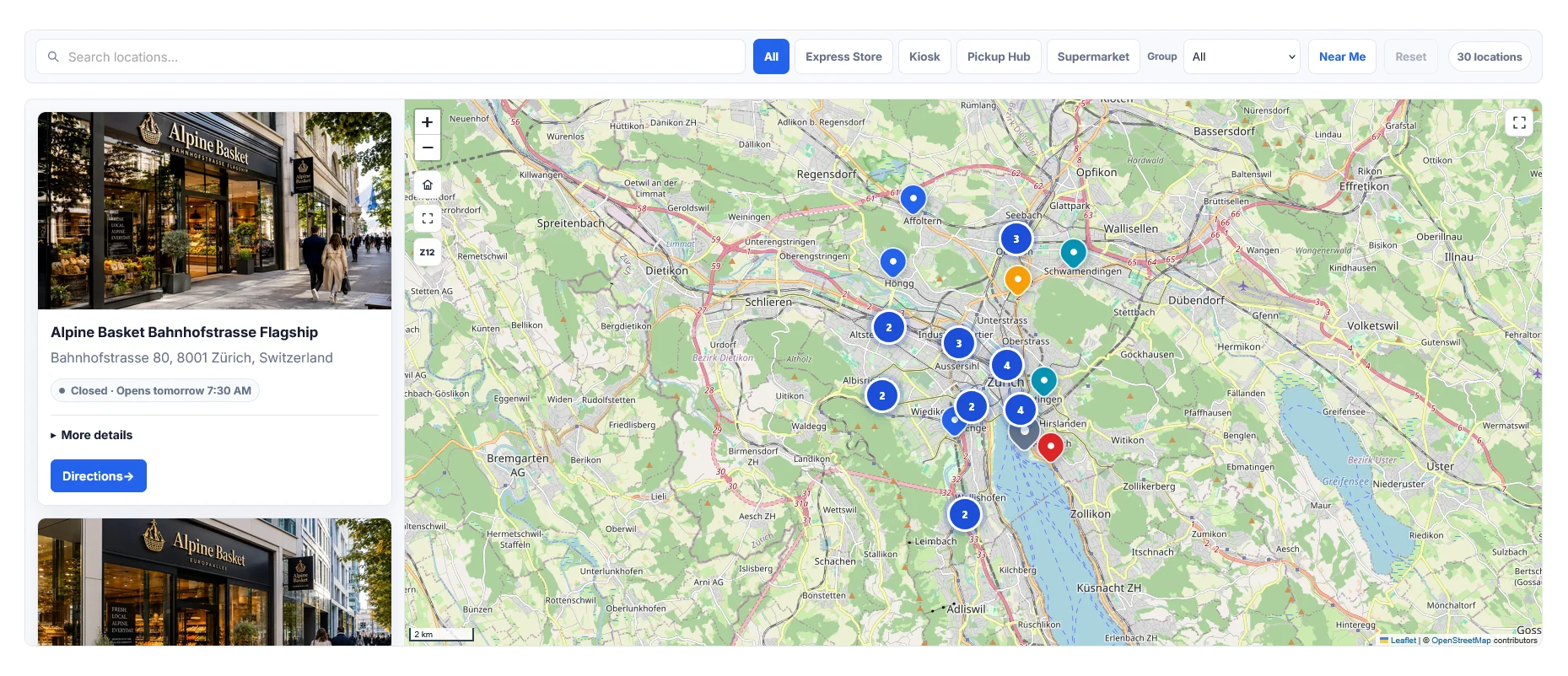
The public locator: map, cards, search, filters, clustering, Near Me and directions.

The public locator: map, cards, search, filters, clustering, Near Me and directions.

The public locator: map, cards, search, filters, clustering, Near Me and directions.

The public locator: map, cards, search, filters, clustering, Near Me and directions.

The public locator: map, cards, search, filters, clustering, Near Me and directions.

Built responsibly

Technical details that matter.

Designed to fit naturally into WordPress while keeping performance, privacy and maintainability in view.

Platform

WordPress-native

Built around familiar WordPress administration and publishing workflows.

Privacy

Privacy-conscious

No Velox telemetry, tracking service, remote Velox scripts or Velox account requirement.

Responsive

Desktop to mobile

Responsive, RTL-aware layouts are designed to work across desktop, mobile and narrow builder columns.

Maintenance

Actively maintained

Updates, compatibility work and documented changes are part of the product lifecycle.

How it works

From installed to embedded in three steps.

The frontend locator is designed around a simple goal: help visitors reach the right location with as little friction as possible.

Under the hood

What you’re actually installing.

Requirements.
  • WordPress6.6 or later
  • PHP7.4 or later
  • MySQL / MariaDBMySQL 5.6+ / MariaDB 10.1+
  • JavaScriptRequired
  • MultisiteSupported
  • Elementor / Gutenberg / ClassicSupported
Footprint.
  • External runtime requestsMap tiles, when a map loads
  • Cookies setNone
  • Telemetry / analyticsNone
  • Database tables added0 (uses postmeta)
  • Frontend assets~30 KB, or ~75 KB on pages with a map locator
  • LicenseGPL-2.0 or later

Documentation

From installation to advanced configuration.

Velox documentation is organized around the work you’re trying to complete, not around a maze of settings pages.

Getting Started →
Map Providers →
Locator Builder →
Elementor Integration →
Import & Export →
Troubleshooting →

FAQs

Common questions.

No. You can use OpenStreetMap Standard or an administrator-configured Custom XYZ provider. Google Maps requires your own browser API key and Map ID.

A Location is one place and its data. A Locator chooses which Locations to show and controls the public layout, map provider, filters, content, styling, behavior and privacy.

Yes. Use List Only. Map libraries and map-provider requests are not needed for that layout.

No. Geolocation is requested only after the visitor activates it, distance calculations occur in the browser, and Velox Map Locator does not persist visitor coordinates.

Yes. Interaction Privacy Mode can keep the external provider unloaded until the visitor chooses Load Map.

Yes. The plugin exposes both a Gutenberg block and a [velox_locator] shortcode, which works inside any page builder that supports shortcodes — which is all of them. If you’re using Elementor, there’s also a dedicated widget in the Velox Featured Image for Elementor plugin.

By default, uninstalling preserves all your locations and settings. If you want a full wipe, enable “Delete all data on uninstall” in the plugin settings before deactivating. That toggle deletes every location, every custom meta field, and the plugin settings row — nothing left behind.

No. The plugin sends no telemetry, analytics, or update pings to Velox or any third party. The only external requests happen when a visitor loads a map — and those go to the map tile provider you chose (OpenStreetMap, Google Maps, or your custom XYZ server). The admin area itself never makes external calls.

Yes. Import / Export provides upload, column mapping, validation preview, confirmation and controlled update-or-create behavior.

No. Velox Map Locator is fully free, released under GPL-2.0-or-later, with every feature available to every user. There’s no premium tier planned. If a feature is missing that you need, tell us — we’d rather add it to the free plugin than gate it.

FAQs

Common questions.

Velox Map Locator
Locations
Dubai Office Downtown Dubai
Abu Dhabi Office Al Maryah Island
Sharjah Office Al Majaz
Central Park Market St
Map Settings

Velox Map Locator

Location finder for WordPress. OpenStreetMap-first, works without Google Maps API keys. Custom locations, filterable locators, CSV import.

Free .  GPL v2 .  WP 6.6+

Explore Map Locator →

Featured Image for Elementor

Dynamic Featured Image support in Elementor. Widget, container backgrounds, and a flexible Featured Hero — without adding Elementor bloat.

Free . GPL v2 . Requires Elementor

Explore Featured Image for Elementor →

Table & Chart Builder
Data Builder
Data Source CSV Import
Chart Type Bar Chart
Responsive
Mobile Cards
Month Orders Revenue
Jan 128 32.4k
Feb 164 41.8k
Mar 198 48.6k
Jan
Feb
Mar
Apr
May
Responsive preview

Table & Chart Builder

Visual table and chart builder for WordPress. CSV import, responsive mobile cards, Chart.js / Plotly / BokehJS bundled locally. No CDN calls.

Free . GPL v2 . Local libraries

Get Updates  →
